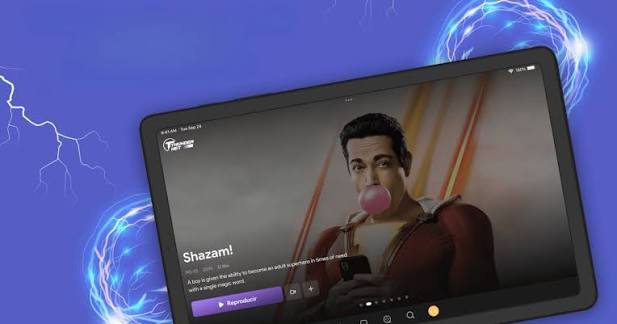
Thunder TV App: Features, IPTV Streaming, Installation, and How It Works
The Thunder TV app is used by several streaming products, which can make it difficult to identify the exact service someone is searching for. Some services using this identity advertise internet television, live channels, movies, television series, and sports content. Other products have their own applications or platforms with different features and subscription arrangements. Before downloading anything, users should confirm the exact developer and official website because similar identities do not necessarily mean the services are connected.
One type of thunder tv app service is promoted as an IPTV platform. IPTV stands for Internet Protocol Television, a method of delivering television content through an internet connection instead of traditional cable or satellite signals. These services may provide live television streams and video-on-demand libraries through a compatible player or application. The exact channels, content, supported devices, and subscription terms vary between providers, so it is important not to assume that every Thunder TV app offers the same experience.
What Is the Thunder TV App?
The Thunder TV app is generally associated with internet-based television and streaming entertainment. Depending on the particular provider, it may allow users to access live television channels, watch movies, explore television series, and view sports programming through a compatible device. Some services are designed for people who want an alternative to conventional cable television, while others operate as media players that organise streaming content from a separate source.
Because several products use similar identities, the Thunder TV app does not refer to one universally recognised streaming platform. A particular application may have its own developer, website, subscription system, and supported devices. Users should check the exact product they intend to use instead of assuming that information about one Thunder TV service applies to another. Confirming the developer and official website is an important first step before installing or paying for anything.
Main Features of the Thunder TV App
thunder tv app services that operate as IPTV platforms commonly advertise live television, sports programming, entertainment channels, movies, and television series. Some versions also promote an electronic programme guide, which displays channel schedules and helps viewers see what is currently playing or coming up next. Video-on-demand features may allow users to select a film or episode rather than watching content according to a broadcast schedule. These features can make internet television feel similar to a traditional television service while offering more flexibility in how content is accessed.
However, advertised features should always be checked against the specific Thunder TV provider. Channel counts, streaming quality, catch-up options, and available programmes may differ between services and subscription plans. A provider may advertise thousands of channels, but that number does not establish that every channel works reliably or is licensed for distribution. Users should look for clear information about the actual service, its content rights, customer support, and cancellation terms before paying for a subscription.
How Thunder TV IPTV Streaming Works
An IPTV service delivers video through an internet connection. When a viewer selects a live channel or on-demand programme, the service sends the video data over the network to a compatible device. The device then decodes and displays the stream. Unlike conventional broadcast television, IPTV can use internet-based delivery systems, allowing content to be accessed through supported televisions, streaming devices, computers, and mobile devices.
The quality of an IPTV stream depends on several factors, including internet speed, network stability, the streaming server, and the device being used. A fast connection may still experience buffering if the Wi-Fi signal is weak or the provider’s servers are overloaded. For smoother playback, users can test their connection, avoid heavy downloads during streaming, and place their router in a suitable location. An Ethernet connection can sometimes provide more consistent performance than Wi-Fi, especially when streaming high-definition or 4K video.
Thunder TV App Compatibility and Supported Devices
Thunder TV providers may advertise compatibility with Android phones, Android TV devices, Amazon Fire TV products, smart televisions, tablets, and other streaming equipment. However, device support is not universal. One provider may support Android-based devices while another may offer a different installation method or exclude certain platforms. Compatibility should therefore be checked on the official website of the particular service rather than inferred from the Thunder TV alone.
Users should also distinguish between an IPTV service and an IPTV player. A player is software that organises and plays video sources, while a service supplies the channels or streaming access. Some players do not provide any television channels themselves and require users to connect their own lawful playlists or subscriptions. Understanding this distinction is important when evaluating app features and deciding what a subscription actually includes.
How to Download and Install the Thunder TV App
The safest way to find a Thunder TV application is to begin with the provider’s verified website or an official app store listing. Check the application description, supported devices, and privacy information before installing. If the service provides an official application through Google Play or the Apple App Store, using that listing is generally preferable to downloading an installation file from an unfamiliar website. A legitimate app listing also makes it easier to review updates and understand the permissions requested by the application.
Some IPTV services distribute Android installation files outside standard app stores. Installing an APK from an unknown source can expose a device to malicious software, unwanted permissions, or modified applications. Users should avoid installing files from shortened links, unofficial social media posts, or websites that cannot clearly identify the developer. If a provider requires sideloading, carefully verify the source and consider whether the service has a trustworthy reputation before proceeding. Never provide account passwords or payment details to an unverified installer.
Thunder TV Subscription Plans and Pricing
Thunder TV pricing depends on which provider or application is being considered. Some services advertise monthly subscriptions, while others offer longer packages that may include several months or a full year of access. A provider may also charge different prices depending on the number of simultaneous connections or supported devices. Because multiple unrelated services use the Thunder TV, there is no single subscription price that applies to every product.
Before purchasing, users should review the full cost of the subscription and understand what is included. A low introductory price may not reflect the renewal cost, and a long-term package may be difficult to recover if the service becomes unavailable. Check whether the plan renews automatically, how cancellation works, whether refunds are offered, and what payment methods are accepted. It is also wise to avoid providers that promise unlimited premium content at unusually low prices without explaining their licensing arrangements.
Is the Thunder TV App Legal and Safe?
The legality of an IPTV service depends largely on whether it has the necessary rights to distribute the television channels, films, and other content it offers. IPTV technology itself is a legitimate way to deliver television over the internet. Many established broadcasters and streaming platforms use internet-based delivery. The important issue is whether a particular provider is authorised to make its content available in the countries where it operates.
Users should be cautious when a service offers premium channels, recent films, and major sports events without clearly explaining its licensing or business arrangements. A provider’s claim that its service is legal does not independently prove that it holds the necessary rights. Before subscribing, look for a clear company identity, transparent terms, contact information, and credible information about content licensing. Using unauthorised streams may expose viewers to copyright-related risks, depending on local law, and can also lead to sudden service interruptions.
Common Thunder TV App Problems and How to Fix Them
Some users may experience buffering, playback errors, missing channels, login problems, or an application that fails to open. These issues can have different causes, so it is helpful to identify the problem before changing settings or reinstalling the app. Buffering may be related to internet speed, weak Wi-Fi, device performance, or problems with the streaming provider. If several channels stop working at the same time, the issue may be connected to the service rather than the user’s television or internet connection.
A sensible troubleshooting approach is to restart the application, check the internet connection, and restart the streaming device if necessary. Users can also check whether the service has announced maintenance or technical problems. If the account has expired, confirming the subscription status may resolve login or playback errors. Avoid downloading unofficial replacement applications or sharing account credentials with strangers who claim they can repair the service. If the problem continues, contact the provider through its verified support channel and provide a clear description of the issue.

Conclusion: Is the Thunder TV App Worth Using?
The Thunder TV app is associated with several streaming products, including IPTV services that advertise live television, movies, series, sports, and internet-based viewing. Depending on the provider, users may find features such as an electronic programme guide, video-on-demand content, and compatibility with selected streaming devices. These features can make internet television convenient, but the exact experience depends on the particular service, its technical quality, and the content it is authorised to distribute.
Before choosing a Thunder TV app, confirm the developer, verify device compatibility, review subscription terms, and check whether the provider has legitimate rights to its content. Avoid suspicious downloads and be careful with long-term payments when a service’s identity or reliability is unclear.