RapidTables Notepad: Features, Uses, Benefits, and How to Use It
RapidTables Notepad is a simple online tool that allows users to write, edit, and manage text directly in a web browser. It is useful for people who need a quick place to write notes, prepare short documents, copy information, or save text without installing additional software. Instead of opening a full word processor, users can visit the website and start typing.
rapidtables notepad is designed for convenience. It provides a straightforward writing space and basic editing options that make everyday text tasks easier. Students can use it for study notes, professionals can prepare quick reminders, and writers can draft ideas before moving them into a larger document. Its browser-based design also makes it accessible from different devices with an internet connection.
Although RapidTables Notepad is not a complete replacement for advanced writing software, it can be a practical option for simple tasks. Understanding its features, saving options, benefits, and limitations can help users decide whether it is suitable for their needs.
What Is RapidTables Notepad?
RapidTables Notepad is an online text editor available through the RapidTables website. It gives users a digital writing area where they can enter and edit plain text without downloading a separate application. The main purpose is to provide a quick and accessible space for everyday writing tasks.
Unlike advanced word processors, which include extensive formatting and document design features, RapidTables Notepad focuses on simplicity. Users can open the tool, type their content, make basic changes, and save their work using the available options. This straightforward approach is useful when someone only needs to write or edit text without dealing with complicated menus.
The tool can be used for personal notes, temporary information, short drafts, lists, and other basic writing activities. It is particularly helpful when users want to work directly in a browser rather than install software on their computers. However, it is important to understand how its storage options work before using it for important information.
How to Access and Open RapidTables Notepad
Opening RapidTables Notepad is a simple process. Users can visit the RapidTables website and navigate to its Notepad tool. Once the page loads, the writing area becomes available, allowing them to begin entering text. No traditional software installation is required for basic use.
The browser-based format makes the tool convenient for people who work on different computers. For example, someone can use it at home, at school, or in an office without needing to install a dedicated text editor on every device. The main requirement is a compatible web browser and an internet connection to access the website.
RapidTables also provides different notepad interfaces, including its main Notepad tool and an alternative Notepad 2 version. The available layout and controls can vary between these versions. Users should choose the interface that feels easiest to use and offers the functions they need for their writing tasks.
Main Features of RapidTables Notepad
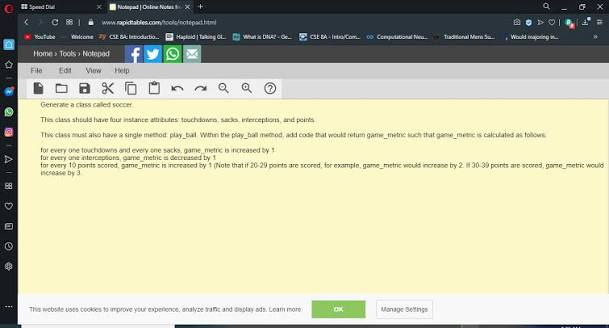
One of the main features of RapidTables Notepad is its simple text-editing area. Users can type information, correct mistakes, remove unwanted words, and organize basic written content. The clean layout helps people concentrate on their writing instead of navigating a complicated collection of tools.
The available editing options depend on the version being used. The Notepad 2 interface provides familiar functions such as creating a new document, opening a file, saving content, printing, and sharing. It also includes common editing commands such as undo, redo, cut, copy, paste, delete, and select all. These options make ordinary text management more convenient.
Some versions also offer display preferences that allow users to adjust their writing environment. Options may include dark mode, zoom controls, font settings, and other appearance preferences. These features can make the editor more comfortable to use, particularly for people who spend longer periods writing or reviewing text.
How to Write, Edit, and Manage Text Online
Writing with RapidTables Notepad is similar to using a basic desktop text editor. After opening the tool, users can click inside the writing area and begin typing. They can prepare short notes, draft paragraphs, collect information, or write reminders. The simple interface makes it suitable for users who do not need advanced formatting.
Editing existing text is also straightforward. Users can select words or paragraphs, remove unnecessary information, copy content, and paste text from other applications. If the selected interface supports undo and redo, these commands can help reverse recent changes or restore an earlier editing action. Standard keyboard shortcuts may also make common tasks faster.
For better organization, users should give their notes clear titles and keep related information together. Someone preparing study material, for example, might create separate notes for different subjects. A professional could use the tool to draft meeting points or prepare a quick outline before transferring the final content into a more advanced document editor.
How to Save and Download Notes in RapidTables
Saving is one of the most important parts of using any online notepad. RapidTables Notepad provides options for preserving written content, but users should understand the difference between temporary browser storage and downloading a file. The main Notepad tool can keep text in a temporary browser cache, while its saving options allow users to download their work.
When users finish writing, they should look for the available save or download control. Depending on the interface, they may be able to enter a filename and save the text to their device. Once downloaded, the file can usually be opened later with a compatible text editor. Keeping a local copy is a sensible way to protect important notes.
Users should not assume that text stored temporarily in a browser will remain available forever. Browser settings, cleared cache data, or other changes can affect temporary information. For this reason, it is better to download important work rather than rely entirely on the browser session. Users should also check the saving preferences available in their chosen notepad version.
Is RapidTables Notepad Safe and Private to Use?
RapidTables Notepad can be useful for ordinary writing, but privacy should always be considered when using an online text editor. Any information entered into a browser-based tool should be treated carefully, especially if it includes personal details, business information, passwords, financial records, or confidential documents.
The main Notepad tool uses temporary browser storage for written content. This means users should not treat it as a permanent or secure document storage service. Temporary data may be lost if browser information is cleared or the relevant storage is removed. Downloading a copy can help prevent accidental loss, but it does not replace a secure backup system.
For sensitive information, users should choose a trusted application designed for secure document storage. They should avoid entering passwords, private account details, or confidential business information into a basic online notepad. It is also sensible to use a secure browser connection and avoid accessing private notes on shared or public computers.
Benefits of Using RapidTables Notepad for Everyday Tasks
One major benefit of RapidTables Notepad is convenience. Users can access a writing space through a browser without installing a separate program. This is helpful when they need to record an idea quickly, prepare a short message, or make a temporary note while working online.
Another advantage is its straightforward design. People who do not need advanced document formatting can complete basic writing tasks without spending time learning complicated software. The familiar editing controls also make it easier to copy, paste, delete, and revise text. This can be useful for students, office workers, writers, and people who regularly handle short pieces of information.
The tool can also support simple productivity habits. Users can write down reminders, prepare rough drafts, collect ideas, or organize information before moving it into another application. Because it focuses on basic text editing, it can be a practical starting point for tasks that do not require professional document layouts or advanced collaboration features.
Limitations of RapidTables Notepad
Although RapidTables Notepad is useful for simple writing, it has limitations. It is not designed to provide every feature found in advanced word processors. Users who need detailed page layouts, professional templates, complex tables, extensive image editing, or advanced formatting may find the available tools insufficient.
Another limitation is that temporary browser storage should not be treated as permanent file storage. If users do not download their work or maintain another copy, they may lose important notes. This makes it less suitable as the only place to keep long-term documents, research material, or business records.
Collaboration is another area where users may need a different solution. People working together on the same document may benefit more from a cloud-based word processor with shared editing, comments, version history, and access controls. RapidTables Notepad is better suited to individual, straightforward text tasks than large collaborative projects.
RapidTables Notepad for Students, Writers, and Professionals
Students can use RapidTables Notepad to write quick study notes, prepare short answers, record important points, and organize ideas for assignments. Its simple interface can be useful when they want to focus on writing rather than formatting. However, students should download important work regularly and use a more suitable document editor when preparing final assignments.
Writers may find the tool helpful for collecting ideas, drafting introductions, preparing outlines, or writing short sections of content. It can serve as a temporary workspace before a draft is transferred into a more advanced writing application. Writers who need formatting, research organization, grammar assistance, or collaboration features will likely need additional tools.
Professionals can use the notepad for reminders, meeting notes, quick messages, and temporary work-related text. It can be convenient when a full office application is unnecessary. However, important company information should be stored in approved workplace systems rather than an ordinary online notepad, particularly when privacy and document management are important.
Conclusion
RapidTables Notepad is a convenient browser-based text editor for people who need a simple place to write, edit, and manage everyday text. Its straightforward interface, familiar editing controls, and saving options make it useful for quick notes, short drafts, reminders, and basic writing tasks. Users can access it without installing traditional desktop software, which adds to its convenience.
However, it is important to understand its limitations. Temporary browser storage should not be considered a permanent backup, and sensitive information should not be entered into a basic online notepad. Users should download important files and choose more advanced applications when they need detailed formatting, secure storage, or collaboration.
Overall, RapidTables Notepad is a practical option for simple text-editing needs. It works best as a lightweight writing tool rather than a complete replacement for professional word-processing or document-management software.